The e-commerce revolution has fundamentally reshaped the consumer landscape, and its influence is undeniable. Businesses seeking growth and wider reach must embrace e-commerce strategies. The trend of online marketplaces like Limeroad, connecting businesses with global audiences, is a testament to this shift. Limeroad, a leading Indian fashion and beauty destination, caters to both men and women with a diverse selection of cosmetics, apparel, fragrances, and more. Renowned for its high-quality products at competitive prices, Limeroad allows customers to discover their favorite designer labels and beauty essentials – all conveniently accessible online.
Maintaining accurate financial records is paramount for sellers on Limeroad, a prominent Indian e-commerce marketplace. Traditionally, reconciling sales data with Limeroad reports has been a laborious and error-prone manual process. This involves extensive time expenditure on data extraction, cleaning, and analysis, hindering operational efficiency. Cointab’s automated Limeroad reconciliation software offers a comprehensive solution, empowering sellers to achieve financial transparency and optimize profitability.
Reports Required for Limeroad Reconciliation:
Reconciling your Limeroad account involves ensuring your internal sales records match the information Limeroad provides. To achieve this, you’ll need to gather several reports:
Limeroad All Order Report: This report provides a comprehensive list of all your orders on the platform. It typically includes details like order ID, order date, customer information, items purchased, order status (placed, shipped, returned, etc.), and total order value.
Limeroad Sales Report: This report focuses specifically on your sales. It might include details like order ID, item sold, quantity sold, selling price, and total sales amount for a specific period. This helps you track your overall sales performance on Limeroad.
Limeroad Payout Report: This report details the payouts you receive from Limeroad. It usually includes information like payout cycle date, order IDs associated with the payout, deducted fees (commissions, taxes, etc.), and the final net amount deposited into your account.
Bank Statement: This is your bank account statement reflecting all the transactions related to your Limeroad business. It shows deposits received from Limeroad payouts and any withdrawals you might have made.
Reconcile your finances with the same efficiency as our successful clients!
Verifying your payments on Limeroad involves a two-step process. First, a summary of your order report is created, with each order having its own unique identifier. Limeroad then uses this order ID to link the order details with both the Sales report and the Payout report. The predicted payout amount, based on the sales information for that specific order, is then compared against the actual payout amount recorded. This reconciliation process ensures all your orders are accounted for and that the payouts you receive match the sales you’ve made. Finally, the results are presented in a clear and concise format, making it easy for you to review and identify any discrepancies.
Limeroad Reconciliation Result
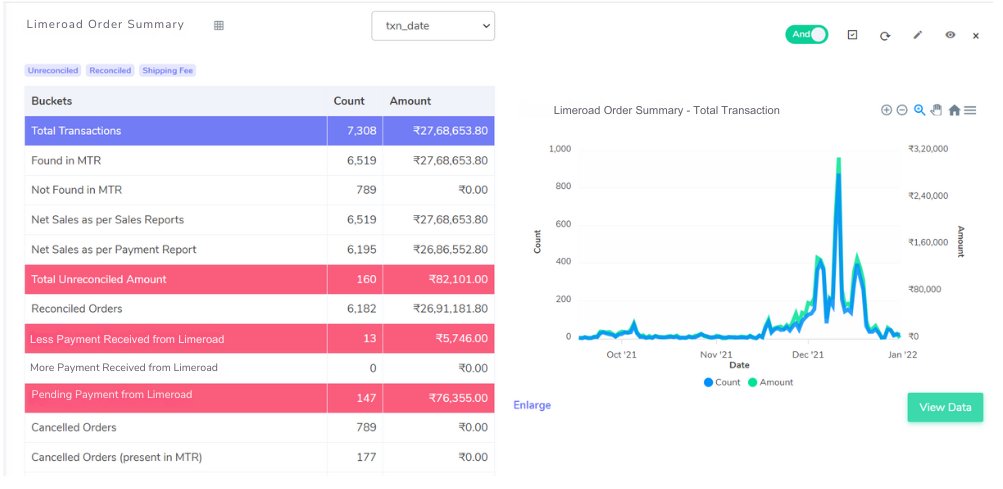
The system links order IDs across your Limeroad Sales Report and Payout Report. It then conducts a rigorous comparison between the expected sales amount from the Sales Report and the actual payout received, highlighting any discrepancies:
Reconciled Transactions: These represent orders where the expected sales amount perfectly matches the actual payout, signifying accurate settlements.
Discrepancies in Received Payments: This section flags instances where the actual payout deviates from the expected sales amount. It further categorizes these deviations:
Less Payment Received from Limeroad: This identifies potential underpayment from Limeroad.
MorePayment Received from Limeroad: This identifies potential overpayment or promotional adjustments by Limeroad.
Pending Payments: This section displays orders for which Limeroad hasn’t confirmed payment yet.
Bank Settlement Reconciliation
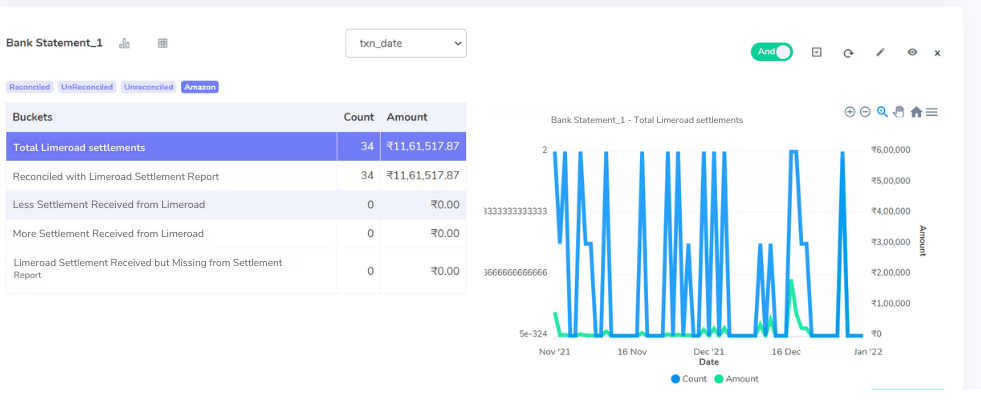
Cointab offers a comprehensive solution that extends beyond Limeroad reports. Following payment reconciliation, the system seamlessly integrates with your bank statements. It matches transactions in your bank statement with the corresponding Limeroad settlement amount, providing a clear and comprehensive picture of received funds:
Reconciled with Limeroad Settlement Report: These represent bank transactions that directly correspond to the confirmed settlement amount from Limeroad, ensuring accurate fund transfers.
Discrepancies in Bank Deposits: This section highlights any discrepancies between the bank deposit and the promised settlement amount:
Less Payment Received from Limeroad: This identifies potential discrepancies between Limeroad’s records and your bank statements.
More Payment Received from Limeroad: This identifies situations where the bank deposit exceeds the promised settlement amount.
Missing Records in Limeroad: This section flags bank transactions where funds were received but not reflected in the Limeroad settlement report, potentially indicating missing records on Limeroad’s end.
Cointab presents the reconciliation results in a user-friendly format, empowering you to effortlessly identify and address discrepancies. This ensures financial transparency, maximizes profitability, and allows you to focus on growing your business on Limeroad with confidence.s on growing your business on Limeroad.
Optimize your financial operations with Cointab's powerful reconciliation software. Join now!
Sign Up For Demo
Optimize your financial operations with Cointab's powerful reconciliation software. Join now!
Sign Up For Demo
Scroll to Top
Limited Time!
Start Your 30 Day Free Trial Today!
Automate your reconciliation, save time and gain financial clarity